🏃 Workouts
Same demo data — six Backer themes, swipe or wait 5s.
🏃 Workouts
344 active days · 44 day longest streak
🌲Classic Green
What you're building
A heatmap you can check in from inside a Notion page in real time — no leaving the page.
3 steps
- 1
Step 1 — Create a habit
Create a new habit and start logging.
- 2
Step 2 — Copy the embed link
Click Embed in the top-right corner of the heatmap. You will see two options:
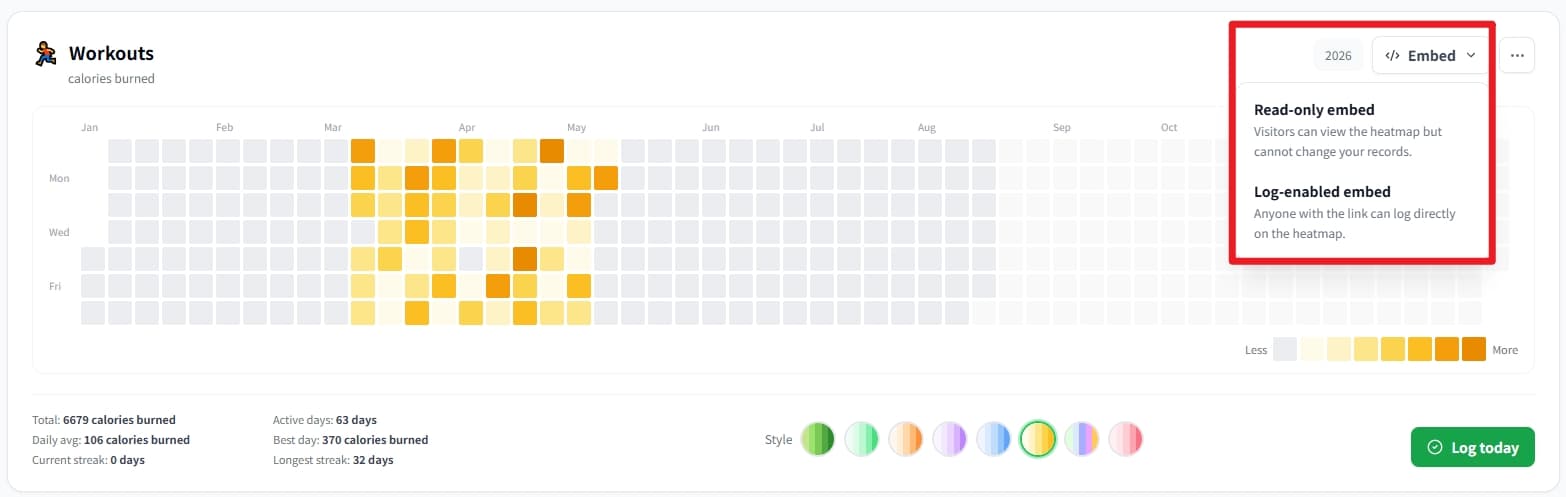
Choose Read-only embed or Log-enabled embed from the Embed menu - Read-only embed: You cannot log directly in Notion, and neither can anyone you share the page with. This protects your heatmap data.
- Log-enabled embed: Anyone who can access your Notion page can log directly, including you. Best for private Notion pages.
- 3
Step 3 — Paste into Notion
Open the Notion page where you want the heatmap
- •Type /embed and choose Embed;
- •Paste the Streakly link and wait 2–5 seconds to load
- •Done
Frequently asked
›Does this work on Notion Free?
Yes. Notion's standard Embed block is available on all plans, including Free and Plus.
›Can I embed multiple habits?
The free plan lets you create up to 2 heatmaps; Backers and Permanent Backers can create up to 30.
›The embed shows 'refused to connect' — fix?
Usually a typo in the URL or a corporate firewall blocking iframes. Re-copy from Streakly, ensure it starts with https://streakly.org/embed/, and try a personal Notion workspace first.
Also useful
Ready to start your streak?
Core tracking features are free to use. If Streakly helps you, you can back us in the app to support continued maintenance and updates.